
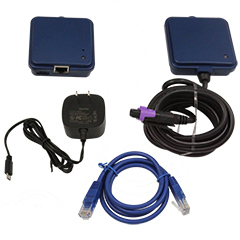
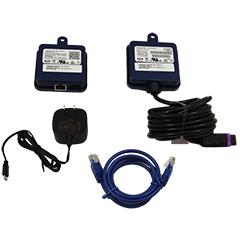
Gecko in.Touch 3 WiFi Module — Spa Remote Control via Smartphone App Control your hot tub from anywhere — adjust temperature, pumps, lights, and more from your phone Product Overview The Gecko in.Touch 3 is Gecko Alliance’s latest WiFi connectivity module that turns your smartphone or tablet into a full-featured spa controller. From anywhere in the world, you can adjust water temperature, control pumps and blower, manage lighting, set filtration cycles, change pump speed, and even control music — all through the free Gecko app on iOS and Android devices. The in.Touch 3 replaces the previous in.Touch 2 (0608-521020) with upgraded software and improved connectivity. The system uses a two-module RF (radio frequency) communication link between your spa and your home router — not direct WiFi — providing a stronger, more stable, and longer-range signal than standard WiFi alone. The Spa Transmitter (CO module) installs under the spa skirt and connects to a CO port on your Gecko spa pack, while the Home Transmitter (EN module) connects to your home router via an included Ethernet cable. Compatible with Gecko in.yj, in.ye, and in.yt spa packs — Versions 2 and higher only. Not compatible with V1 systems, Gecko S-Class, M-Class, X-Class, in.xm, or in.xe. You can also receive real-time push notifications for preventive maintenance tailored to your spa routines, and monitor your spa’s status remotely. For water quality monitoring (pH/ORP), the in.Touch 3 version with Gecko Waterlab compatibility is required instead. IMPORTANT — VERSION CHECK REQUIRED: Your spa pack label must clearly display “V2” or “V3” and have a 13-digit ID number (e.g., 0610-221046-355). V1 systems have a 10-digit ID number and are NOT compatible. Key Features Full Remote Spa Control — Adjust temperature, pumps, blower, lights, filtration cycles, pump speed, and music from your phone Free Gecko App — Available on iOS (8.0 ) and Android (2.3 ) from App Store and Google Play Control from Anywhere — Works over your home network or remotely via the internet RF Communication Link — Proprietary radio frequency between spa and router for stronger, longer-range signal than standard WiFi Push Notifications — Real-time alerts for maintenance and spa status even when the app isn’t open Two-Module System — Spa Transmitter (CO) Home Transmitter (EN) included as a complete kit Simple Plug-and-Play Installation — CO module plugs into spa pack CO port, EN module connects to router via Ethernet Automatic Firmware Updates — Regular system updates for ongoing improvements and compatibility Pre-Paired from Factory — Modules ship already paired for faster setup Replaces in.Touch 2 — Direct upgrade from 0608-521020 with improved software OEM in Master Spas — Part number X801776, also found in Maax Spas and others Technical Specifications Specification Value Manufacturer Gecko Alliance Product Name in.Touch 3 Part Number 0608-521047 Product Type WiFi Connectivity Module / Spa Remote Control Interface Module Dimensions 3.2″ × 2.9″ Frequency (Electrical) 60 Hz (North American model) Home Transmitter Power 120V wall mount power adapter (included) Router Connection RJ45 Ethernet — 100 Mbps wired LAN port required Ethernet Cable 3-foot (0.9 m) cable included Communication Type Proprietary RF (radio frequency) link between CO and EN modules Option Codes on Label EN-V2 (Home Transmitter) and CO-V2 (Spa Transmitter) App Gecko app (iOS and Android) — NOT in.touch Home or in.touch World App Compatibility iOS 8.0 or higher, Android 2.3 or higher Router Requirement Standard router with available 100 Mbps RJ45 LAN port, Port 10022 open (normally default) Spa Pack Connection CO port on compatible Gecko spa pack Waterlab Compatible No — for water monitoring use in.Touch 3 instead What’s in the Box Item Description Spa Transmitter (CO Module) Installs under spa skirt, connects to spa pack CO port Home Transmitter (EN Module) Connects to home router via Ethernet cable Ethernet Cable 3-foot (0.9 m) RJ45 cable for router connection Wall Mount Power Adapter 120V adapter with wire for Home Transmitter Installation Guide Setup and pairing instructions Compatibility Guide CRITICAL — Compatible Spa Packs (MUST Verify Before Purchase) Spa Pack Version 2 (V2) Version 3 (V3) Version 1 (V1) in.yj Compatible Compatible NOT Compatible in.ye Compatible Compatible NOT Compatible in.yt Compatible Compatible NOT Compatible NOT Compatible With: Gecko S-Class, M-Class, or X-Class systems Gecko in.xm or in.xm2 Gecko in.xe Any Version 1 (V1) spa pack Any non-Gecko spa control system (Balboa, etc.) How to Identify Your Spa Pack Version Check V2 or V3 (Compatible) V1 (NOT Compatible) ID Label Clearly shows “V2” or “V3” No “V2” or “V3” mentioned ID Number 13 digits (e.g., 0610-221046-355) 10 digits (e.g., 0610-221020) Manufactured 2012 or later Before 2012 WHERE TO FIND: The spa pack name (in.yj, in.ye, in.yt) and version (V2, V3) are on the ID label attached to the front cover of the spa pack. The version is in the “Options” section of the label. in.Touch 3 vs in.Touch 3 — What’s the Difference? Feature in.Touch 3 (This Product) in.Touch 3 Remote Spa Control Yes Yes Gecko App Yes Yes Push Notifications Yes Yes RF Communication Yes Yes Gecko Waterlab Compatible No Yes Water Quality Monitoring (pH/ORP) No Yes (with Waterlab probe) If you need water quality monitoring, choose the in.Touch 3 instead. If you only need remote spa control, the in.Touch 3 is the right choice. Alternate Part Numbers & Cross-References Primary Part Numbers Part Number Description 0608-521047 Gecko / Parts4Tubs SKU IN.TOUCH 2-KIT-GD-V Gecko product designation X801776 Master Spas OEM part number 59-402-1030 Distributor reference (PartsForSpas) Replaces (Discontinued Models) Part Number Description 0608-521020 in.Touch 2 — directly replaced by in.Touch 3 34-0216G-K Earlier in.Touch version 381659 Earlier in.Touch version 34-0216F in.Touch WiFi Module Platinum Y Series (discontinued) 0608-521012 in.Touch 1 original model (discontinued) 110333 Maax Spas in.Touch 2 part number (replaced by in.Touch 3) Related Cross-References (in.Touch 2 Part Numbers Also Replaced) Part Number Description 59-337-1000 in.Touch 2 distributor number 59-337-1002 in.Touch 2 distributor number 59-355-2000 in.Touch distributor number 9735-500 in.Touch distributor number 3-90-0122 in.Touch distributor number 3-90-0160 in.Touch distributor number 3-90-0161 in.Touch distributor number 0699-607001 Original in.Touch part number 10-720-1012 in.Touch distributor number Compatible Spa Brands (Verified OEM Use) Brand Notes Master Spas OEM — part number X801776 Maax Spas OEM — replaces PN 110333 (in.Touch 2) Many spa brands use Gecko control systems. If your spa has a Gecko in.yj, in.ye, or in.yt V2/V3 spa pack, the in.Touch 3 is compatible regardless of the spa brand name on the cabinet. Installation Guide Step 1 — Install the Spa Transmitter (CO Module) Turn off the spa’s power (breaker) before installation. Mount the CO module under the spa skirt, as high as possible in a corner facing your home router Install at least 12 inches (30 cm) away from any metal component or metal structure for optimal RF transmission Connect the CO module cable into an available CO port on your Gecko spa pack (or any accessory with a free CO port, such as the in.stream 2 audio amplifier) The CO module must be at the end of the CO chain if multiple accessories are on the same CO port Do NOT power the spa back on yet — install the Home Transmitter first. Step 2 — Install the Home Transmitter (EN Module) Connect the included Ethernet cable from the EN module to an available RJ45 LAN port on your home router Connect the wall mount power adapter to a 120V household outlet near the router Connect the USB cable between the power adapter and the EN module Step 3 — Power Up and Pair Turn the spa breaker back on The modules are pre-paired from the factory — they should connect automatically within a few seconds If re-pairing is needed: press the pairing button on the Home Transmitter (EN) with a paperclip until the LED flashes YELLOW rapidly, then turn the spa breaker off, wait a few seconds, and turn it back on Step 4 — Download the Gecko App and Connect Download the Gecko app from the App Store (iOS) or Google Play (Android) Ensure your phone/tablet is connected to the same WiFi network as your router Follow the in-app setup instructions to add your spa IMPORTANT — Use the Gecko app only. The in.Touch 3 does NOT work with the older “in.touch Home” or “in.touch World” applications. LED Status Guide LED Color Home Transmitter (EN) Spa Transmitter (CO) BLUE (Solid) Normal — full internet connection to server Normal — connected to spa pack GREEN Connected to router, but in.Touch 3 server unreachable — check Port 10022 and internet — YELLOW (Flashing Rapidly) Pairing mode Pairing mode (briefly during power-up) RED No router detected — check Ethernet cable and router power — Troubleshooting Issue Solution Can’t find spa in the app Ensure phone is on the same WiFi network as the router. Verify EN module LED is GREEN or BLUE. EN module LED is RED Router not detected. Check that Ethernet cable is firmly connected at both ends. Try a different cable. Verify router is powered on. EN module LED is GREEN (not BLUE) Router connected but server unreachable. Check that Port 10022 is open on your router (normally open by default). Verify internet connection. Both LEDs flashing YELLOW Modules are in pairing mode. Turn spa breaker off, wait, then on. Pairing should complete in seconds. App shows wrong information Ensure you have the Gecko app — not the older “in.touch Home” or “in.touch World” apps. Signal is weak or intermittent Move CO module higher under spa skirt. Ensure at least 12″ from metal. Reduce distance between CO and EN modules. Thick walls and metal structures reduce signal. Spa lost pairing after power outage Pairing is stored in non-volatile memory — it should survive power outages. If lost, re-pair using the paperclip button on the EN module. What You Can Control Function Details Water Temperature Set and monitor temperature setpoint Pumps Turn on/off, control speed Blower Turn on/off Lights Turn on/off Music Control if in.stream audio system is installed Filtration Cycles Adjust filter cycle schedules Care Settings Manage spa care and maintenance settings Spa Status Monitor remotely from anywhere Push Notifications Receive alerts for preventive maintenance Frequently Asked Questions Q: Is this compatible with my spa? A: The in.Touch 3 works with Gecko in.yj, in.ye, and in.yt spa packs — Versions 2 and 3 only. Check your spa pack’s ID label for the version. It must show “V2” or “V3” with a 13-digit ID number. It is NOT compatible with V1 systems, in.xm, in.xm2, in.xe, S-Class, M-Class, or X-Class. Q: Does this replace the in.Touch 2? A: Yes. The in.Touch 3 (0608-521047) directly replaces the discontinued in.Touch 2 (0608-521020) with upgraded software. The new model may still say “In.Touch 2” on the product stickers, but the option codes will read EN-V2 and CO-V2 instead of EN and CO. Q: What’s the difference between in.Touch 3 and in.Touch 3 ? A: The in.Touch 3 includes everything the in.Touch 3 does, plus compatibility with Gecko Waterlab for continuous water quality monitoring (pH/ORP). If you don’t need water monitoring, the standard in.Touch 3 is the right choice. Q: What app do I need? A: The Gecko app — available free on App Store and Google Play. Do NOT use the older “in.touch Home” or “in.touch World” apps — those are for previous versions. Q: Does this connect via WiFi? A: Not directly. The in.Touch 3 uses a proprietary RF (radio frequency) link between the spa transmitter and home transmitter. The home transmitter then connects to your router via a wired Ethernet cable. This RF approach provides stronger, more stable, longer-range connectivity than direct WiFi. Q: Does my router need special configuration? A: In most cases, no. The system requires Port 10022 to be open, which is the default on most routers. If you have issues, check your router settings for this port. Q: Can I control my spa from outside my home? A: Yes. Once connected to your home router and the internet, you can control your spa from anywhere in the world through the Gecko app. Q: Are the modules pre-paired? A: Yes. The Spa Transmitter and Home Transmitter ship pre-paired from the factory. They should connect automatically when both are powered on. Re-pairing is only needed if you replace a module. Q: Does this work with Balboa, Jacuzzi, or other control systems? A: No. The in.Touch 3 is designed exclusively for Gecko Alliance spa control systems (in.yj, in.ye, in.yt V2 ). Q: Can I control more than one spa? A: Each in.Touch 3 module pair controls one spa. You would need a separate in.Touch 3 kit for each spa. During pairing, only power one spa at a time. Q: What if I have a V1 spa pack? A: V1 spa packs are NOT compatible with the in.Touch 3. Contact Gecko Alliance or Parts4Tubs to discuss upgrade options. Downloads & Resources Gecko Alliance — in.Touch 3 & 3 TechBook (PDF) — Complete installation manual, LED status guide, pairing instructions, and router requirements Why Choose the Gecko in.Touch 3 Control Your Spa from Anywhere — Temperature, pumps, blower, lights, filtration, and music from your phone Free Gecko App — Intuitive interface on iOS and Android Push Notifications — Real-time maintenance alerts even when the app isn’t open RF Long-Range Communication — Stronger, more stable signal than direct WiFi Pre-Paired from Factory — Plug-and-play setup with minimal configuration Automatic Firmware Updates — Stay current with latest features and improvements Latest Generation — Replaces in.Touch 2 with upgraded software (EN-V2/CO-V2) Complete Kit — Two transmitters, Ethernet cable, and power adapter all included OEM Trusted — Used by Master Spas, Maax Spas, and other major brands Why Buy from Parts4Tubs Fast shipping across the United States Expert advice from spa and hot tub specialists Competitive pricing Full warranty support Hassle-free returns Complete range of Gecko spa parts, controls, and accessories Compatibility verification assistance before purchase Dedicated customer service team Summary The Gecko in.Touch 3 (0608-521047) is the latest-generation WiFi connectivity module for Gecko-controlled spas, replacing the in.Touch 2 with upgraded software. Control your spa’s temperature, pumps, blower, lights, filtration cycles, and music from anywhere via the free Gecko app on iOS and Android. The two-module RF communication system provides reliable long-range connectivity. Compatible with Gecko in.yj, in.ye, and in.yt spa packs — Versions 2 and 3 only (verify your spa pack ID label before ordering). Complete kit includes both transmitters, Ethernet cable, and power adapter. For water quality monitoring, choose the in.Touch 3 instead. Order from Parts4Tubs today.